
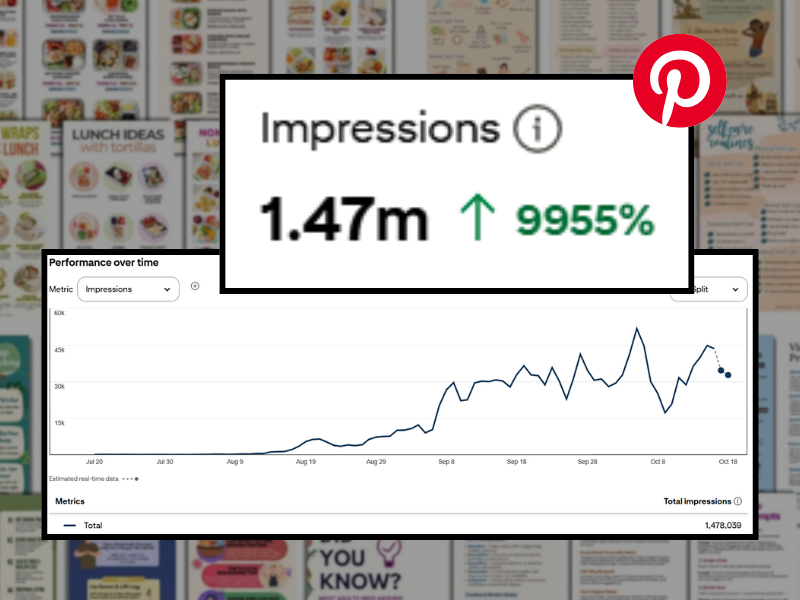
After months of trying different strategies, I’ve cracked the code and found a rhythm that made every account hit.
I used to be so crazy about Pinterest.
I’ve probably watched every video and blog about different Pinterest strategies. Some say 15 pins per day is ideal, while others say not to pin more than 10 a day.
It was all confusing and I wasn’t getting the result I wanted.
So, I did it my way instead and just enjoyed Pinterest like any other user.
Andddd, to my surprise, it helped me grow a Pinterest account faster than I ever thought I could.
Here’s the strategy I did..
Jump To..
- #1. Get more ‘SAVES’
- #2. Engage with other pins
- #3. Save old pins to other related boards
- Growing a Pinterest Account from 0 to 1M
#1. Get more ‘SAVES’
I honestly got tired of overthinking and overdoing things just to grow the Pinterest accounts I’m managing. So I tried to simplified my approach, and only created and scheduled 5 pins per week.
Those pins I posted weekly weren’t just basic ‘image-text’ type of pins. They were informational, relatable, and creatively designed. Surprisingly, those pins pulled in 100k+ to 1M+ monthly impressions and up to 15k+ saves per month.

After handling multiple Pinterest accounts and trying out different techniques, I figured out this one type of pin gets a lot of saves and works every time.
The Infographic Pins
Most of the pins that performed best were the infographics.
These pins are either a list of useful or informative tips, a collage of recipes with their ingredients, or any type of content that people find save-able. Step-by-step guides, helpful checklists, or visually appealing infographics, these pins give users something they can reference later, making them more likely to engage and save.
Here are the infographic pin samples I usually design and share on Pinterest:

Pin Design and Keyword Research
Before creating the pins, I’d do a quick keyword research on Pinclicks and Pinterest research on my chosen topic to see what people likes to save.
There’s this tool that helped me see which type of pins are getting the most number of saves. It ‘s saved me a lot of time and helped me see what really resonates the most to Pinterest users. Check it out here: “Tools I Used to Create Pins That Go Trending Like Crazy”
I usually don’t spend more than 10 minutes on research. Once I found the inspo with the most saves and identified the keyword with the highest search volume, I’d design my own pins, then schedule them, all in one go.
How to get more “SAVES”?
Basically…
- Identify popular pins
- Find the right keywords and incorporate those to your pins
- Be unique with your design and concept, do not copy.
- Make it very valuable
It’s not always about having the prettiest design, I figured that what really matters is how relatable, valuable and helpful the pins are.
That’s what drives the saves every single time.
Also, one thing I noticed, it isn’t always about pinning MORE content. It’s about understanding what people want to click on.
Why do SAVES matter?
I worked with one client for nearly 9 months in the Pilates, workout and self care niche. During that time, we tested a variety of strategies to see what will work best.
Initially, we focused on simple ‘image-text’ pins designed to drive outbound clicks, but we aren’t getting enough outbound clicks. Later, I began creating and pinning infographic-style pins, and that’s when we noticed a shift. The infographic pins started getting a high number of saves, and that seemed to boost the visibility of our other pins as well.
It appeared that the more saves we got from the infographics, Pinterest pushes our ‘image-text’ pins to more audience, which directly increased our outbound clicks to 25k+ monthly.

- infographic pins = saves and traffic
- image-text pins = outbound clicks
That combination has been the magic formula for me.

#2. Engage with other pins
Like any other Pinterest user, I spend at least 5-10 minutes every day just engaging with other people’s pins.
Repinning, liking, and commenting.
I’ll repin random pins to our existing boards (as long as they actually fit the niche). Then I’d drop a few comments, hit the like button here and there, and that’s it.
Nothing complicated, but I noticed it seriously helps. Pinterest (I believe) starts noticing that I’m active, and it shows my pins to more user.
Also to back up this approach, I’ve noticed I get more comments from other people since I started doing it.
To prove this approach, I did a case study about this. Check it out “How Interacting With Other Pin Users Helped My Pins Gets More Visibility”
#3. Save old pins to other related boards
There was this time when our impressions started dipping, so I decided to test something new.

I didn’t increase the number of pins to help the numbers back up.
What I did instead, I repinned some of our old pins to different boards, and surprisingly, the numbers went back up. Those same pins even ended up becoming top performers.
After that, I started repinning a few old pins every week, and quickly saw how it helped boost their impressions.
Growing a Pinterest Account from 0 to 1M
Doing those 3 things is what really helped me hit 1M impressions in just 2 months.
I began pinning in the first week of August. The account started gaining steady traction after the first week of September, and by October, we hit 1 million impressions.

Our initial priority was to grow the Pinterest account, so I focused on creating the infographic pins to encourage more saves and impressions. Once we had built a strong presence, I shifted my focus to designing image-only pins that aimed to increase outbound clicks.
Read my case study about “How to Increase Your Outbound Clicks on Pinterest”

Once you’re getting a lot of impressions and saves on Pinterest, that’s the best time to leverage and get more outbound clicks to your website.
Pinterest is still one of the best sources of traffic. People still use Pinterest a lot of time. It’s definitely worth leveraging as a key platform for driving consistent, long-term traffic.
Hope this all helps!
Leave a Reply